Why Your Website Gets Traffic but No Leads: 9 Conversion Rate


Published On: November 5, 2026
A website getting traffic but no leads has a conversion problem, not a traffic problem. Fix the offer, headline, call to action, enquiry form, and page speed. Conversion rate optimization turns your existing visitors into enquiries.
You open Google Analytics and see 3,000 sessions this month. Your inbox shows two enquiries. Maybe none. The SEO invoice and the ad bill still arrive on time.
This is the most common complaint we hear from business owners in India, the USA, and Australia. It hits real estate firms, clinics, coaching institutes, restaurants, travel agencies, and online stores alike. The site looks good. Visitors arrive. They leave without doing anything.
The hard part is already done. You have the visitors. This guide shows why they leave, and the nine fixes that send them to your form, your phone, and your checkout instead.
Website Getting Traffic but No Leads: What Is Actually Going Wrong?
Visitors skip your enquiry form for one of four reasons. Identify yours before you change anything.
- Wrong audience. Your pages rank for, or you run ads for, searches that don’t match what you sell.
- Weak message. Visitors can’t tell in five seconds what you offer, who it’s for, and why you.
- Friction. The form is long or broken. The page loads slowly. The phone number isn’t tappable.
- No trust. Nothing on the page proves you deliver.
These are the four most common low conversion rate reasons. Most sites have two or three at once. A website not converting visitors rarely needs a full redesign. It needs a short list of specific edits.
Website traffic but no sales? Check your traffic source first
Open Google Analytics 4. Go to Reports → Acquisition → Traffic acquisition. Compare each channel’s engagement rate and key events.
- Organic traffic, high engagement, no conversions: the page has no clear next step.
- Paid traffic, low engagement: the ad promises something the page doesn’t deliver.
- Social or referral traffic, near-zero conversions: these visitors are browsing. Judge these channels on awareness, not leads.
Online stores follow the same logic. Shoppers who add to cart but don’t buy point to shipping cost, trust, or checkout friction. Visitors who never reach a product page point to navigation or targeting.
What Is a Good Website Conversion Rate?
Most service websites convert 2% to 5% of visitors into enquiries. E-commerce stores usually land between 1% and 3% for purchases. A dedicated landing page with a single offer often reaches 5% to 10%.
Treat these as ranges, not targets. Your own baseline matters more.
Conversion rate = (leads ÷ sessions) × 100
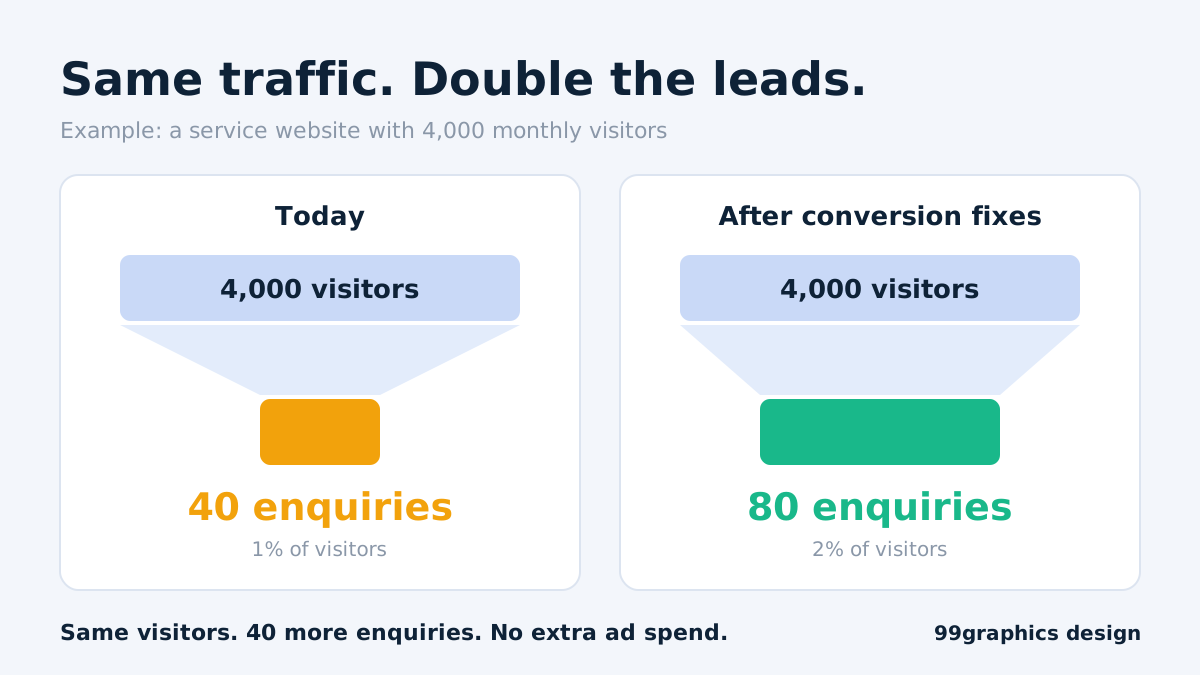
Here is the math that makes this worth your time. A site with 4,000 monthly sessions and 40 enquiries converts at 1%. Lift it to 2%, and you get 80 enquiries from the same traffic. No extra ad spend. No new backlinks. That is the case for conversion rate optimization: you double the output without doubling the input.
Segment the number before you act on it:
- By device. A site converting 3% on desktop and 0.4% on mobile has a mobile problem.
- By source. Compare organic, paid, social, and direct separately.
- By page. Your top five landing pages by traffic deserve the first fixes.
9 Conversion Rate Fixes That Bring Leads Back
Fix 1: Match the page to the promise (landing page optimization)
Every visit starts with a promise: a search result, an ad, or a social post. If the page doesn’t repeat that promise in the headline, visitors leave within seconds.
Do this:
- List your top five landing pages by traffic.
- Write down the search query or ad copy that sends people there.
- Check that the H1 reflects it, nearly word for word.
Landing page optimization starts with this message match. Someone who clicked “emergency plumber in Perth” should read “Emergency Plumber in Perth, 60-Minute Response.” They should not read “Welcome to our company.”
Never send paid traffic to your homepage. Build one page per offer.
Fix 2: Rewrite the headline and the first screen
Visitors decide in about five seconds. The first screen must answer three questions before anyone scrolls:
- What do you do?
- Who is it for?
- What should I do next?
Weak: “Innovative digital solutions for your business.”
Strong: “Website design for Kolkata clinics that fills your appointment calendar.”
Add one subheading with a specific outcome. Add one button. Remove auto-rotating sliders. They push your message down and split attention.
Fix 3: Use one clear call to action (CTA optimization tips)
A page with five competing buttons earns no clicks. Pick one primary action per page and make everything else support it.
These CTA optimization tips work across industries:
- Write action plus benefit. “Get my free website audit” beats “Submit.”
- Repeat the button above the fold, after your proof section, and at the bottom.
- Use a contrasting colour that appears nowhere else on the page.
- Add a risk reducer under the button: “No spam. We reply within one working day.”
- Quieten secondary actions such as “View portfolio” so they don’t compete.
Test CTA optimization tips one at a time. Changing text, colour, and position together tells you nothing.
Fix 4: Repair the enquiry form
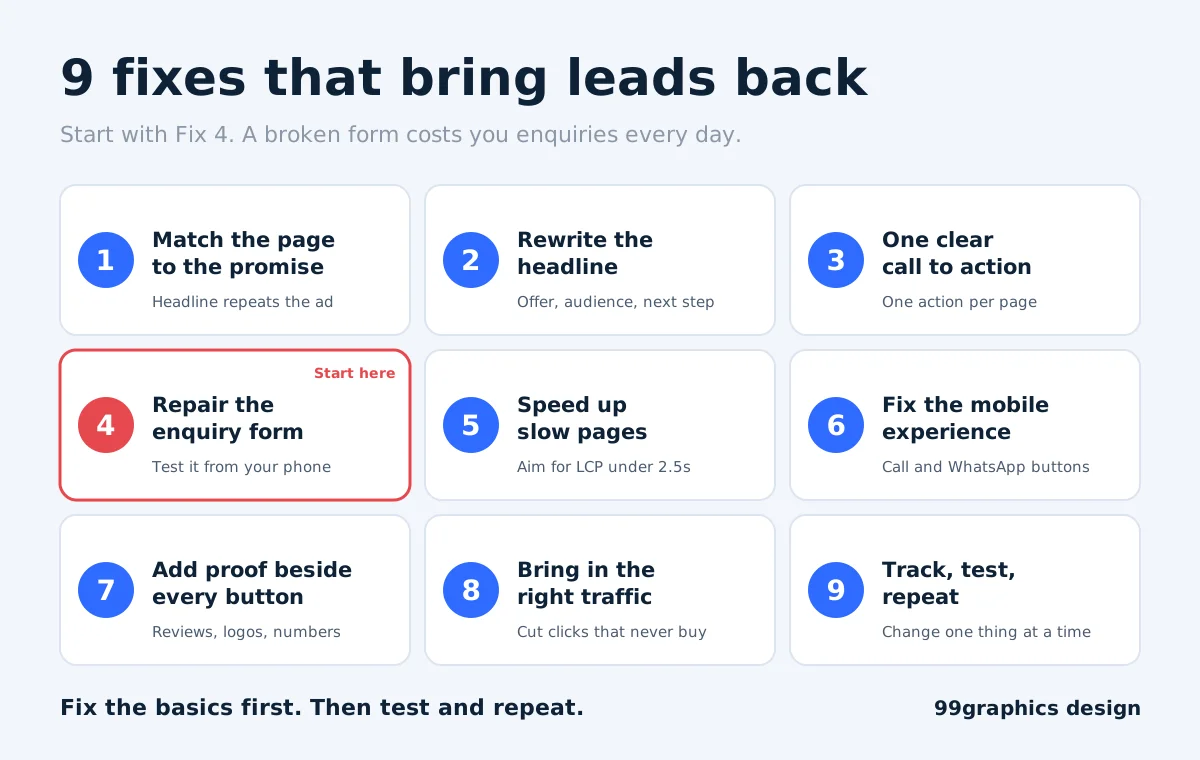
Check this fix first. A website enquiry form not working is the most expensive and most overlooked reason for zero leads. Plugin updates, expired SMTP settings, and security tools break forms silently. You never see an error. You just stop getting enquiries.
Test it today:
- Submit the form from your phone and your desktop.
- Confirm the notification email arrives, and check the spam folder.
- Make sure the receiving address is a live inbox, not a former employee’s.
- Check that CAPTCHA or a security plugin doesn’t block real users.
- Confirm the thank-you page fires a conversion event in GA4.
Then shorten the form. Every extra field cuts completions. Ask for a name, a phone number or email, and one message box. Qualify the lead on the call. Long enquiries, such as property or treatment requests, work better as multi-step forms with a progress bar.
Set a monthly reminder to test the form. Treat it like a fire alarm.
Fix 5: Fix speed and the website bounce rate high reasons
The main website bounce rate high reasons are slow loading, message mismatch and intrusive pop-ups. Speed is the easiest to measure and fix.
Google research on mobile pages found the probability of a bounce rises 32% as load time goes from one second to three seconds. Slow pages lose people before your headline appears.
Run your top pages through PageSpeed Insights. Then work through this list:
- Convert images to WebP and compress them.
- Lazy-load images below the fold.
- Remove plugins and scripts you don’t use.
- Enable caching and a CDN.
- Host close to your audience.
Aim for a Largest Contentful Paint under 2.5 seconds. That is Google’s “good” threshold for Core Web Vitals.
Note that GA4 reports engagement rate, the inverse of bounce rate. Use engagement rate to judge whether a page holds attention.
Fix 6: Improve website user experience for leads on mobile
In India, most visits come from smartphones. In the USA and Australia, mobile is the majority of traffic for most local service searches. Yet many sites are still designed on a desktop-first basis.
To improve website user experience for leads on mobile, apply these basics:
- Pin a click-to-call button to the bottom of the screen.
- Add a WhatsApp button. It converts well in India because people prefer chat over forms.
- Make tap targets at least 44 pixels tall.
- Set body text to 16 pixels or larger.
- Remove pop-ups that cover content on load.
- Trigger the numeric keyboard on phone fields.
Offer more than one way to reach you. Some visitors want to call. Some want to chat. A few want to book a slot. A calendar widget often outperforms a form for consultations. These website lead generation tips cost little and add a lot.
Fix 7: Put proof next to every call to action
Visitors need evidence before they hand over a phone number. Put trust signals beside the button, not hidden on an About page.
- Client logos and named testimonials with a photo, role, and company
- Specific results with real numbers
- Case studies that name the problem, the work, and the outcome
- Your Google review rating
- A response-time promise or guarantee
- A real address, a real phone number, and photos of your actual team
Generic claims like “best quality service” prove nothing. A name, a number, and a face do.
Fix 8: Bring in the right traffic
Sometimes the page is fine. The traffic is wrong. Open Google Search Console and the Google Ads search terms report, then read the actual queries.
- Informational queries such as “what is SEO” bring readers. Commercial queries such as “SEO company in Kolkata” bring buyers.
- Add negative keywords in Google Ads. Start with “free”, “jobs”, “course”, “salary”, and “template”.
- Build content around buying intent and location. Our guide to choosing an SEO company in Kolkata shows how to read pricing and timelines.
- Pair every blog post with a relevant offer: an audit, a checklist, or a quote request.
This is how to get more leads from website traffic without raising your budget. Cut wasted clicks first. Our Search Engine Optimization and Paid Advertising teams start every engagement with this query review.
Fix 9: Track, test and repeat
Conversion rate optimization is a loop, not a one-time project. Build the loop like this:
- Track key events in GA4: form submit, call click, WhatsApp click, and booking.
- Watch behaviour. Microsoft Clarity is free. Review two weeks of recordings and heatmaps. Look for rage clicks, dead clicks, and the point where scrolling stops.
- Write one hypothesis. Example: “Cutting the form from seven fields to four will raise submissions.”
- Change one thing. Run the test for at least two full weeks, so it covers weekdays and weekends.
- Keep the winner. Then test the next idea.
If a page gets under 1,000 visitors a month, skip A/B testing. The sample is too small. Make a change, then compare the before and after periods instead.
CRO Tips for Small Business: Start in This Order
Small teams can’t fix everything at once. Rank each task by impact and effort.
| Priority | Action | Effort | Impact |
|---|---|---|---|
| 1 | Repair the form and set up conversion tracking | 1 hour | High |
| 2 | Rewrite the headline and main CTA | Half a day | High |
| 3 | Add click-to-call and WhatsApp buttons | 1 hour | High on mobile |
| 4 | Shorten the form | 1 hour | Medium |
| 5 | Add proof beside the CTA | Half a day | Medium |
| 6 | Compress images and clean up plugins | 1 day | Medium to high |
| 7 | Build dedicated landing pages for paid traffic | 2 to 3 days | High |
These CRO tips for small business cost almost nothing in the first three rows. Small budget conversion rate optimization begins there, not with expensive redesigns.
Industry Quick Wins
The nine fixes apply everywhere. These edits give each industry a faster start.
- Real estate: Show price range and location above the fold. Add a “Schedule a site visit” button.
- Healthcare: Put the appointment button, doctor credentials, and clinic timings on the first screen.
- Education: Lead with outcomes, such as placements or pass rates. Add a “Download the brochure” form.
- E-commerce: Show delivery time and return policy on the product page. Offer guest checkout.
- Restaurants: Make the menu a web page, not a PDF. Add “Order” and “Reserve” buttons.
- Travel: Show the full price and inclusions. Add a WhatsApp button for quick quotes.
How to Increase Website Conversion Rate in 30 Days
Use this schedule if you want a plan you can start on Monday. It works as a compact conversion rate optimization sprint.
- Week 1, audit: Set up GA4 key events. Test every form. Record your baseline conversion rate by device and source.
- Week 2, basics: Rewrite the headline and CTA on your top three pages. Shorten the form. Add click-to-call and WhatsApp.
- Week 3, speed and proof: Compress images, remove dead plugins, and add testimonials and numbers beside each button.
- Week 4, test: Launch one test on your highest-traffic page. Compare results with your Week 1 baseline.
Expect the basic fixes to move the number first. Testing builds on that foundation.
Get a Free Website Audit From 99graphics design

If your site has visitors but no enquiries, the cause is almost always on this list. We check each item for you.
At 99graphics design, our team in Kolkata and New York reviews your analytics, forms, mobile experience, and page speed. You get a prioritised fix list, not a generic report. Our conversion rate optimization service handles testing and tracking. Our Website Design team rebuilds pages that can’t be fixed with edits.
Book a free 15-minute call, and we will tell you where your leads are leaking.
FAQs (SEO Optimised for Featured Snippets)
Why is my website not getting enquiries?
Your website is not getting enquiries because visitors can’t see what you offer, can’t find a clear next step, or can’t trust you. Other causes include a broken enquiry form, slow loading, poor mobile design, and traffic from the wrong keywords. Test the form first, then review your headline and call to action.
What is a good website conversion rate?
A good website conversion rate for service businesses is 2% to 5%. E-commerce stores typically convert 1% to 3% of visitors into buyers. Dedicated landing pages can reach 5% to 10%. Your industry, traffic source, and offer change the number, so compare against your own baseline first.
How can I convert website visitors into leads?
Give each page one clear offer and one call to action. Match the headline to the visitor’s search or ad. Shorten your form, add click-to-call and WhatsApp buttons, and place testimonials beside the button. Speed up the page, then track every form submission and call click in GA4.
How long does conversion rate optimization take?
Basic fixes, such as repairing forms, rewriting headlines, and adding call buttons, show results within two to four weeks. Structured testing takes three to six months to produce reliable gains. Timelines depend on traffic. Pages with under 1,000 monthly visitors need longer to prove a change worked.https://99graphicsdesign.com/wp-admin/media-upload.php?post_id=13136&type=image&TB_iframe=1
Does website speed affect lead generation?
Yes. Slow pages raise bounce rates and lower form submissions, especially on mobile. Google research found bounce probability rises 32% when load time moves from one second to three. Aim for a Largest Contentful Paint under 2.5 seconds. Compress images, remove unused plugins, and use caching.
How much does CRO service cost in India?
CRO service in India typically costs ₹15,000 to ₹50,000 per month for small and mid-size businesses. The price depends on traffic, number of pages, and testing scope. One-time audits cost less. Ask for a written scope that lists tracking setup, tests per month, and reporting.

Ready for
Digital Transformation?